Wait! Don’t Go Yet! 👋
We see you eyeing those adorable outfits! 😍 Before you leave, here’s 10% OFF your first order!
Hurry, your little one’s next favorite outfit is waiting! 🛍️✨

We see you eyeing those adorable outfits! 😍 Before you leave, here’s 10% OFF your first order!
Hurry, your little one’s next favorite outfit is waiting! 🛍️✨
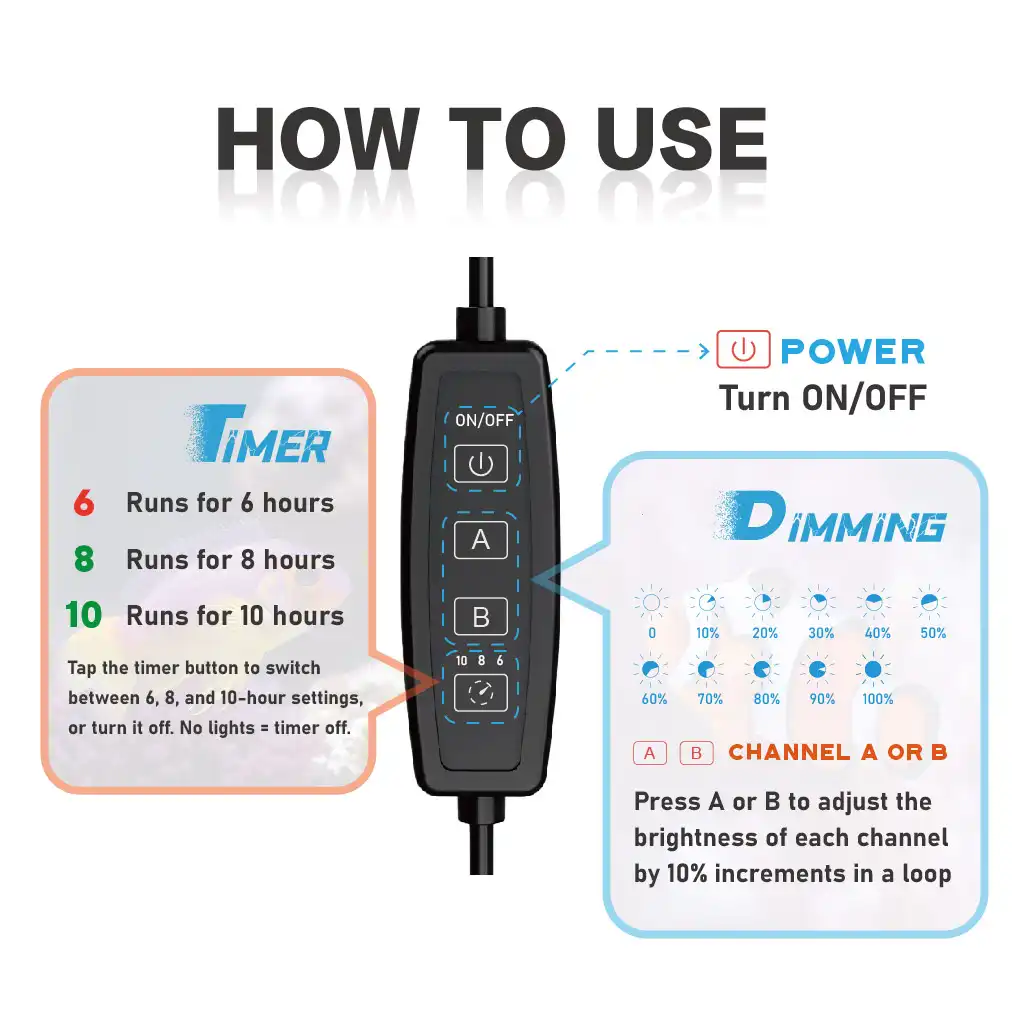
The SPECTRAQUA SP20 LED Aquarium Light is a next-generation 20W smart aquarium light available in three versions: marine, freshwater, and refugium, ideal for nano aquariums up to 30 gallons (50L); the saltwater version meets the lighting needs of corals and marine invertebrates, the freshwater version caters to fish and aquatic plants in freshwater tanks, and the refugium version stands out with its ideal spectral output, promoting healthy algae growth to support nutrient export in aquarium systems, while all versions feature dual independent dimming channels and 10 brightness levels for tailored light intensity, 3 timer settings to simulate natural cycles, and an IP65 waterproof rating for safe use in humid environments—perfect for nano tanks under 30 gallons, blending functionality and durability for optimal aquatic lighting.